AI meeting assistants look deceptively simple: record audio, transcribe it, extract some notes. But the production architecture is more involved. You're dealing with real-time audio streams, speaker attribution, LLM latency, and a pipeline that has to work reliably while people are in the middle of important calls.
This is how we'd architect one from scratch.
The Core Pipeline
At a high level, the data flows like this:
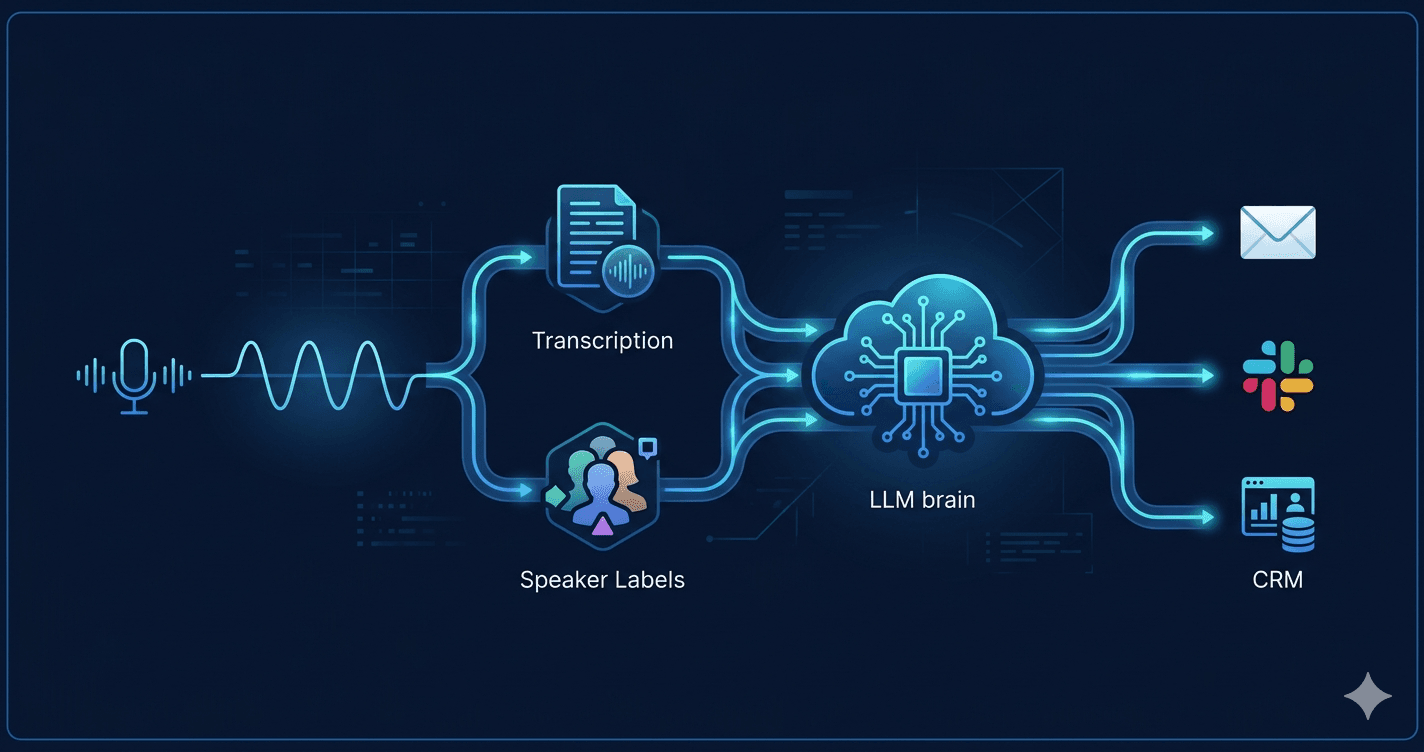
Audio capture → Real-time transcription → Speaker diarization
    → LLM processing → Structured output → Delivery (CRM, email, Slack)
Each stage has different latency and reliability requirements. Getting the boundaries right is the key design decision.
Audio Capture
The audio source determines everything downstream. There are two main scenarios:
Browser-based capture — The user runs a web app or browser extension. Use the Web Audio API (MediaRecorder) to capture microphone input and send PCM chunks over a WebSocket to your backend. Chunk size matters: 250ms chunks give you responsive transcription without overwhelming the stream.
Bot joining the call — For Zoom, Google Meet, or Teams integration, a headless browser bot (Puppeteer or Playwright) joins the meeting and captures the audio output. Services like Recall.ai abstract this, handling the platform-specific joining mechanics and delivering a single audio stream.
For most products, start with browser capture. Bot-based capture handles the "I forgot to enable the extension" case but adds significant operational complexity.
Real-Time Transcription
Two options dominate here:
Whisper (self-hosted or via API) — OpenAI's Whisper is highly accurate, particularly for technical vocabulary. The hosted API (whisper-1) is straightforward but adds latency per request. For real-time feel, stream audio chunks to a self-hosted Whisper instance running on a GPU and use Faster Whisper with beam_size=1 for low-latency incremental output.
Deepgram or AssemblyAI — Streaming APIs purpose-built for this use case. Lower integration complexity, better real-time latency than batched Whisper calls, and built-in speaker diarization. Deepgram's Nova-2 model is the current benchmark for accuracy-to-latency tradeoff.
For a production product, Deepgram or AssemblyAI is the pragmatic choice. Self-hosting Whisper makes sense if you have strict data residency requirements or want to avoid per-minute API costs at scale.
Speaker Diarization
Diarization — attributing transcript segments to individual speakers — is what separates useful meeting notes from a wall of undifferentiated text.
Deepgram and AssemblyAI both include diarization in their streaming APIs (returned as speaker_0, speaker_1, etc.). The labels are positional, not named. To resolve them to actual names, you need one of:
- Pre-enrollment — Ask users to say their name at the start; match voice embeddings to the utterance
- Calendar integration — Pull attendee list from Google Calendar or Outlook, present the list in the UI, and let the user assign labels manually after the call
- Name detection — Run a simple NER pass over the transcript looking for greeting patterns ("Hi, I'm Sarah") during the first few minutes
The calendar approach is the most reliable and lowest friction. Most users already have integrations with their calendar.
LLM Processing
This is where the raw transcript becomes something useful: a summary, action items, decisions, follow-up questions. The transcript arrives chunked and messy — false starts, filler words, crosstalk. The LLM needs context to make sense of it.
Don't process chunks in real-time. It's tempting to pipe each transcript segment through an LLM as it arrives. In practice, the model lacks context to identify action items mid-conversation, costs balloon, and the output is incoherent. Process at natural breakpoints: end of call, or in 5-10 minute segments for very long calls.
Prompt structure that works well:
You are analyzing a meeting transcript. The meeting was between: {attendees}.

TRANSCRIPT:
{diarized_transcript}

Extract the following as JSON:
- summary: 3-5 sentence overview
- action_items: array of { owner, task, due_date (if mentioned) }
- decisions: array of decisions made
- open_questions: unresolved questions raised
- next_meeting: any mentioned follow-up date/time
GPT-4o and Claude Sonnet handle this well. For a 1-hour meeting (roughly 8,000–12,000 tokens of transcript), you're well within a single context window.
Token cost at scale: A 1-hour meeting at GPT-4o pricing is around $0.05–0.10 per call. Acceptable for a paid product; worth watching at high volume. If cost becomes a concern, Claude Haiku or GPT-4o-mini handles structured extraction tasks with comparable accuracy at a fraction of the cost.
Data Model
The core entities:
Meeting
  id, title, started_at, ended_at, platform, host_user_id

Participant
  id, meeting_id, display_name, speaker_label, email (nullable)

TranscriptSegment
  id, meeting_id, speaker_label, text, start_ms, end_ms

MeetingNote
  id, meeting_id, summary, action_items (JSON), decisions (JSON),
  open_questions (JSON), generated_at, model_used
Keep TranscriptSegment rows — don't only store the processed output. Users will want to search transcripts, and you'll want to re-process with improved prompts later.
Delivery Integrations
The note is only useful if it goes somewhere the user already works:
- Email — Send the summary to all participants via SendGrid or Resend immediately after the call ends. Lowest friction, highest adoption.
- Slack — Post to a configurable channel. Use Block Kit for structured output (action items as checkboxes).
- CRM — Write a call log to HubSpot or Salesforce via their APIs. Map participants to CRM contacts by email. Action items can become tasks.
- Notion / Confluence — Create a page per meeting in a designated workspace. Good for teams that already document everything there.
Implement email first. The others are valuable but depend on your users' existing workflows.
Handling Failures Gracefully
A few scenarios you'll hit in production:
Transcription gaps — Audio quality drops, participants mute/unmute frequently, or multiple people talk at once. Use a confidence threshold from the transcription API; flag low-confidence segments in the UI rather than silently discarding them.
LLM timeouts — If the processing job fails, queue it for retry with exponential backoff. Store the raw transcript first, then process asynchronously — the note being a few minutes late is acceptable; losing the transcript is not.
Meeting joins mid-call — If the bot or extension starts recording 10 minutes in, the LLM summary should reflect that. Add a system prompt note: "Recording began partway through the meeting; early context may be missing."
Privacy and Compliance
Meeting recordings touch sensitive data. A few requirements you can't defer:
- Consent notice — Display a visible indicator when recording is active. Some jurisdictions (California, Germany) require two-party consent.
- Data retention policy — Let users set how long transcripts are stored. Auto-delete after 90 days by default; give enterprise customers configurable retention.
- Encryption — Transcripts at rest should be encrypted. If you're storing audio, encrypt it too. Most teams don't need to store audio at all once transcription is complete.
- Data residency — Enterprise buyers will ask. Know which regions your transcript data passes through and where it's stored.
Scaling Considerations
A single-tenant prototype can run the entire pipeline synchronously. At multi-tenant scale, the architecture shifts:
- Audio ingestion and transcription stay in real-time services
- LLM processing moves to an async job queue (BullMQ, SQS, or similar)
- Transcript storage moves to a purpose-built table with partitioning by
started_at - Delivery integrations become separate workers, each with their own retry logic
The bottleneck at scale is almost always the LLM processing step — not because of cost, but because of rate limits on the API provider. Design for queued, retryable processing from the start.
Where to Start
If you're building this from scratch, the minimum viable pipeline is:
- Browser microphone → WebSocket → Deepgram streaming transcription
- Store segments in Postgres as they arrive
- On call end, send transcript to GPT-4o with a structured extraction prompt
- Email the output to all participants
That's a working product. Everything else — CRM sync, speaker name resolution, real-time UI, bot-based capture — is layered on top once you've validated that the core output is useful.
The hardest part isn't the technology. It's prompt engineering the extraction step to be consistently reliable across meeting types — status syncs, sales calls, technical discussions, and executive reviews all have different vocabularies and structures. Budget time for that iteration.
If you're building an AI product and want architecture guidance from a team that's shipped production LLM integrations, let's talk.